Lab Environment
To test the idea, I acted as a k8s instructor and created a set of simple labs covering core tasks: creating, scaling, and exposing deployments. Each lab includes up to 20 commands with deliberate typos, wrong flags, labels, and namespaces.
K8s labs are well-suited for this kind of experiment. The environment is safe, so if something goes wrong, I just delete the K3D cluster and start over in under a minute.
Architecture
A small LLM isn’t reliable enough to handle the full workflow. The tool is split into components:
- Command extraction
- Syntax validation
- Execution in k8s
- Stderr analisys
- Iterative fixing based on the results
Beyond syntax errors, the agent also checks that the lab remains logically correct.
Approach and Constraints
No CrewAi or LangChain here. I drew inspiration from articles like Docker in Bash and Docker in Ruby, where engineers took a simple approach to rebuilding enterprise tools. I kept that same spirit here, using plain prompts, Python, and local models.
And yes, I know that Cursor, Antigravity, and Claude can do this. But for me, this is a fun experiment, and the goal is to integrate the tool into a pipeline, not an IDE.
Extraction: Small Ollama-Hosted Models
I started small with Gemma 3:1B, a model running on Ollama on my MacBook. The goal: parse the lab’s commands and see what happens. I wrote a simple extraction prompt and ran the extractor against the smallest model. It was fast and cheap, and my MacBook stayed cool. Here are the results from three runs.
======================================================================
Iter | Cmds | Curl? | JSON? | Lat (s) | Tokens
----------------------------------------------------------------------
1 | 10 | True | True | 7.92 | 583
2 | 9 | True | True | 6.75 | 544
3 | 8 | False | True | 7.06 | 575
======================================================================
The results were messy. With this level of determinism, prompt-based fixing isn’t reliable. We'll need some help from Qwen8b. Unfortunately, Qwen just cooked my MacBook for seven minutes and didn't give me anything useful.
On to Gemma 3:4B. The difference is like night and day: the model identified 16 out of 16 commands across multiple iterations with no syntax errors. It was slower (about 27 seconds instead of 7). Still, the 4B version handled tricky tasks that the smaller model missed, such as escaping nested JSON strings in kubectl patch commands and spotting environment variable dependencies like export NODE_PORT. And this was without adjusting temperature or top_k settings.
======================================================================
Iter | Cmds | Curl? | JSON? | Lat (s) | Tokens
----------------------------------------------------------------------
1 | 16 | True | True | 28.51 | 1237
2 | 16 | True | True | 27.44 | 1202
3 | 16 | True | True | 27.18 | 1183
======================================================================
Cool? Yes, kind of.
The next day, I tried extraction again with a tougher prompt, and the model struggled. It was still consistent, but I only got 12 out of 16 right. LLMs, like people, have good and bad days. Keep that in mind!
Let’s set the temperature to 0, to make it less "creative”.
"options": {
"temperature": 0.0,
"num_predict": 2048,
"top_k": 1,
"top_p": 0.0,
After I shortened the output and switched to one-shot parsing, the results became consistent again.
==================================================================
Iter | Cmds | Curl? | JSON? | Lat (s) | Tokens
----------------------------------------------------------------------
1 | 16 | True | True | 29.72 | 1310
2 | 16 | True | True | 27.95 | 1310
3 | 16 | True | True | 27.94 | 1310
======================================================================
So, 4b looks like it can work grep | wc -l, and gather the commands from the lab. But is it doing the job correctly?
When I introduced intentional errors like depolments and -o wede, the model fixed the typos on its own and returned the correct commands. That’s impressive, but it doesn’t solve the documentation validation problem.
Giving the model a clear instruction in the prompt helped.
1. **LITERAL COMMAND EXTRACTION**: You are a copy-paste robot. Extract commands EXACTLY as they appear, including all typos. DO NOT FIX THEM.
Did it actually work? Since the model is deterministic, I ran it a few more times to check.
Lab 1
| Target (Typo/Error in Lab) | Run 1 Status | Run 2 Status | Run 3 Status | Verdict |
| sca.le (dot typo) | FAIL (ID missed) | SUCCESS (preserved) | SUCCESS (preserved) | Unstable focus |
| depolyment (typo) | SUCCESS (preserved) | SUCCESS (preserved) | SUCCESS (preserved) | Stable (expected behavior) |
| -o json_path (underscore) | FAIL (fixed to jsonpath) | SUCCESS (preserved) | SUCCESS (preserved) | Inconsistent auto-fixing |
| items[0] → items[*] | FAIL (corrupted) | FAIL (corrupted) | FAIL (corrupted) | Systemic Hallucination |
| nginx-deployments (plural) | SUCCESS (preserved) | SUCCESS (preserved) | SUCCESS (preserved) | Stable (expected behavior) |
Lab 2
| Feature / Target | Run 1 Status | Run 2 Status | Run 3 Status | Verdict |
| crete (typo) | SUCCESS (preserved) | SUCCESS (preserved) | SUCCESS (preserved) | Perfect literal extraction |
| deploymenst (typo) | SUCCESS (preserved) | SUCCESS (preserved) | SUCCESS (preserved) | Perfect literal extraction |
| Environment Export | FAIL (skipped) | FAIL (skipped) | FAIL (skipped) | Systemic Context Loss |
| Multi-command Blocks | FAIL (filtered) | FAIL (filtered) | FAIL (filtered) | Semantic Filtering |
Lab2 is a bit larger and, surprisingly, more stable, but still not quite there. It deterministically drops commands from multicommand blocks, picking only what it thinks is most important, and keeps only the kubectl part from commands like export XXX | kubectl YYY.
Extraction: Big Models
Poor extraction hurts the process, no matter how good the next model is. Even clear instructions can be missed by small models. Time to bring in the big guns: Claude or Gemini.
Gemini3-flash-preview from AI Studio gave good results and parsed everything correctly. It followed the prompt and kept the output as-is.
| ID | Command Extracted | Status | Extraction Strategy | Logic Preservation |
| 1-2 | cluster-info, get nodes | SUCCESS | Atomic: Split one block into 2 entries. | High |
| 3-5 | crete, deploymenst, get pods | SUCCESS | Literal: Preserved typos crete and deploymenst. | High |
| 8 | jsonpath='{.spec.type}' | SUCCESS | Exact: No attempt to "fix" syntax. | High |
| 12 | export NODE_PORT=$(...) | SUCCESS | Contextual: Recognized export as a vital command. | Perfect |
| 13 | curl -I ...$NODE_PORT | SUCCESS | Dependency: Kept the variable usage intact. | Perfect |
| 14 | get pods ... -o wede | SUCCESS | Literal: Preserved wede typo. | High |
| 15-16 | get svc, get endpoints | SUCCESS | Atomic: Did not filter out "verification" steps. | High |
Here's the main point: a small model without fine-tuning or clear instructions is a poor parser. It ignores instructions and outputs what's statistically likely rather than what's actually in the text. Even if it knows kubectl syntax well, it's not a reliable extractor. For better results, use a larger model. Gemini-flash is fast, cheap, and good enough for this. The task doesn’t require deep reasoning; just a model that can follow instructions over a medium-sized context.
Syntax Validation: Small Ollama-hosted Models
Now it gets interesting. We have a JSON file from Gemini3 with the extracted commands. Let's run syntax checks and see if the model can spot simple typos and handle tougher cases like wrong labels or missing namespaces.
A simple one-shot attempt showed that the model is good at finding and fixing typos:
"fix": "kubectl create deployment nginx-demo --image=nginx:stable",
"reason": "Typo: 'crete' should be 'create'",
and
"fix": "kubectl get deployment nginx-demo",
"reason": "Typo: 'deploymenst' should be 'deployment'",
That’s exactly what I wanted. But the results aren’t consistent across all runs and error types. Here’s what happened in a second test:
| Error Category | Original Input | Model Response | Result | Analysis |
| Command Typo | crete deployment | crete deployment | FAILED/PARTIAL | Identified as INVALID, but the fix was identical to the error. |
| Resource Typo | get deploymenst | get deployment | PASSED | Correctly identified and fixed the typo |
| Alias Handling | patch svc | VALID | PASSED | Recognized svc as a legitimate alias for service. |
| Flag Value | --replicas=-1 | --replicas=1 | FAILED (Over-fix) | Performed a logical fix instead of a syntax audit. |
| Output Format | -o wede | (Skipped/Ignored) | FAILED | Completely missed the typo in the output flag. |
I have intentionally added a specific case to test model limitations. This is what I have in the test lab:
"kubectl create deployment fail-demo --image=nginx --replicas=-1",
It has replicas -1, which is obviously incorrect, and the model is smart enough to see this. But it doesn't know the correct value: 1, 2, or 11. The model should flag it, not fix it. Gemma corrected it to 1 anyway. The command works, but that's not the point.
When I changed the prompt to separate syntax fixes from semantic ones, the results became inconsistent. The model can’t reliably distinguish between them.
Small models try to help even when it's not needed, a bit like our helpful relatives. We can’t trust their guesses, so it’s time to use larger models again.
Syntax Validation: Big Models
When asked to correct syntax, the big model found typos during extraction without any specific prompting. In the expected outcome field, it is already noted:
"expected_outcome": "Attempts to create a deployment; will fail due to typo 'crete'."
In other words, it extracts and validates syntax simultaneously, something larger models do well.
This changes the setup. Instead of using several validators, we can let Gemini extract and validate, then run the commands in the cluster and check the results. For labs in the 5–8K token range, big models handle this just fine.
We’re going from complicated:
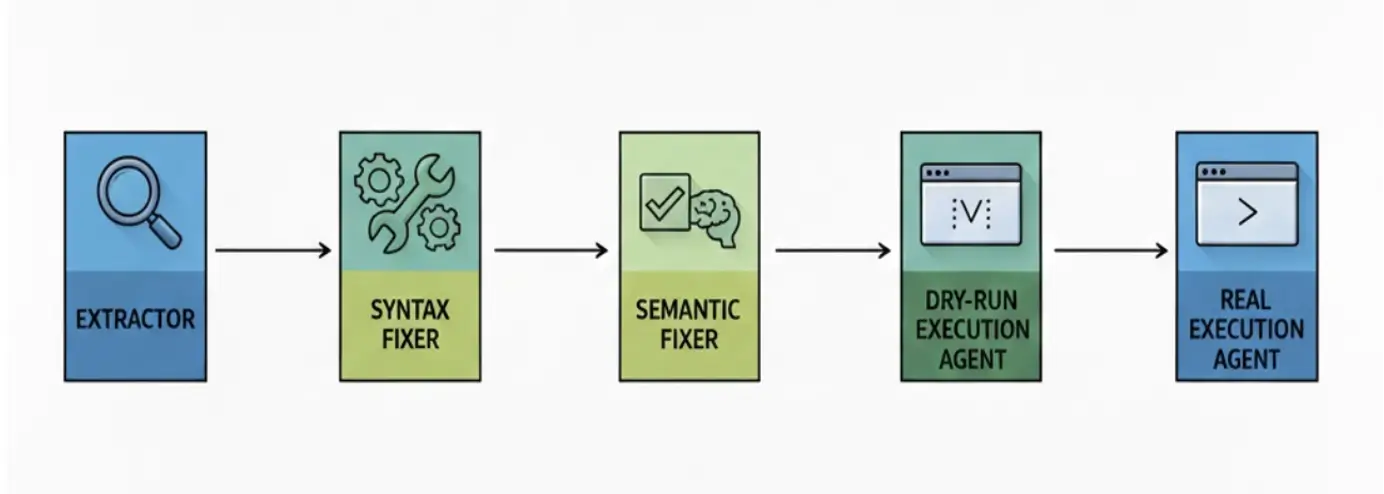
to simple:
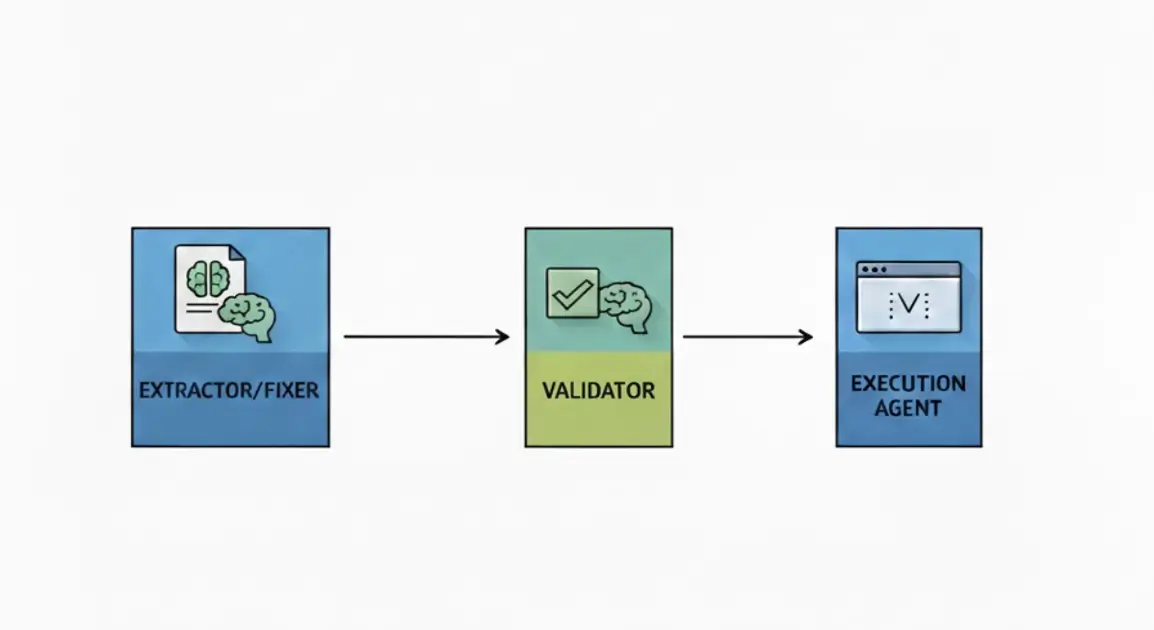
The updated output includes intent, suggested fix, and original text for full context:
The model successfully grabbed the commands, suggested fixes, and correctly provided the user's intent.
"id": 3,
"tool": "kubectl",
"command": "kubectl crete deployment nginx-demo --image=nginx:stable",
"suggested_fix": "kubectl create deployment nginx-demo --image=nginx:stable",
"original_text": "## Step 1: Create Nginx Deployment\nCreate a basic Nginx deployment to serve as the backend for our services.\n# Create the deployment",
"intent": "Create a deployment named nginx-demo using the nginx:stable image.",
"expected_outcome": "[WILL_FAIL] The verb 'crete' is a typo. Kubernetes will return 'Unknown command'."
This looks good, but LLMs can be confidently wrong, so validation is still necessary.
It helps to have the LLM take on another role and check the results of the first step. I asked Gemini Flash to act as a quality assurance lead and review the work.
### ROLE
Infrastructure Quality Assurance Lead.
Claude Sonnet would be the best choice here, since it’s known for handling these tasks well. But Claude isn't available in Google's free AI studio, and Anthropic doesn't offer a similar free option, so I used Gemini Flash again.
The results are promising.
Gemini call completed: 19.43s, Tokens: 5772
{"status": "verified", "missing_commands": []}
On cost, this call was free under AI Studio's free tier, but at market rate, it would run about:
Input cost: Approximately $0.0008658
So, if we have to validate several labs twice a month, it's possible.
Agent: The Tools that Will Run the Commands.
The extractor works, and the validator checks its output. Now it‘s time to create a real agent. The component that will execute commands one by one, read the result, and suggest a fixed command if something went wrong. For the first iteration, we won't implement complex retries or chains. The basic architecture is the following.
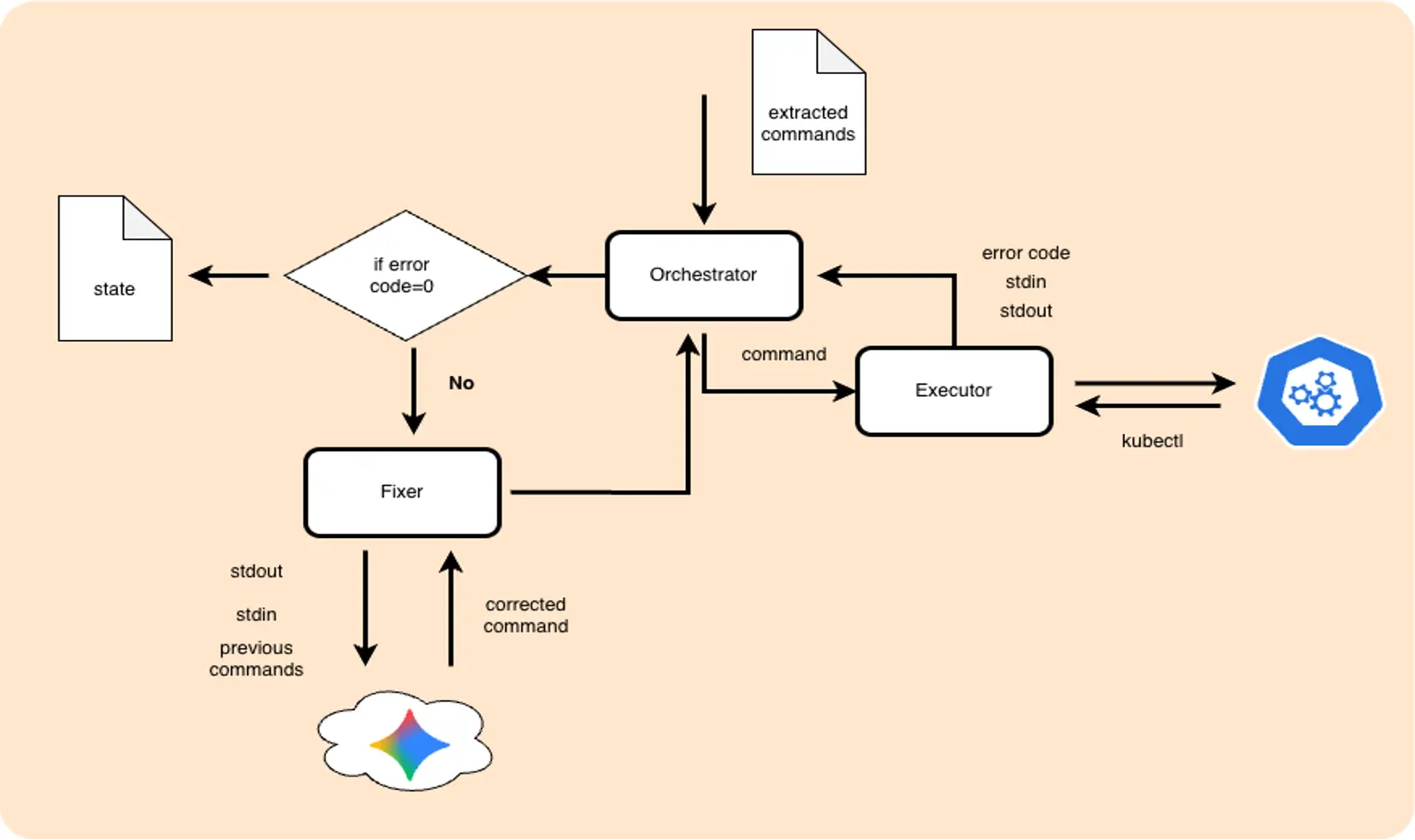
To make things more interesting, I introduced not only syntax errors but also logical ones. Which I expect will need some effort.
Take lab1:Some commands are missing the namespace key. The command itself is valid, but it fails because it runs in the wrong namespace.
The expected behavior for an agent to add the missing "create ns" command, and a -n flag for all commands where it's not presented. It's a bit more complex than just fixing typos, so let's see. As an alternative, I expect the agent to cut corners and remove the -n flag, using the default namespace for everything. We'll use prompting to steer it away from that shortcut.
Here's the full list of errors in lab 1:
| Error Category | Specific Token / Issue | Description | Reference (ID) |
| Syntax (Typo) | depolyment | Typo in the Kubernetes resource noun. | #3 |
| Syntax (Typo) | sca.le | Illegal character (dot) within the kubectl verb. | #6 |
| Syntax (Flag) | -o json_path | Incorrect flag naming; used an underscore instead of the standard jsonpath. | #8 |
| Logical (Namespace) | Missing -n test | Command is valid, but targets the default namespace instead of the previously created test environment. | #4, #7, #9, #10 |
| Logical (Pre-requisite) | Namespace not found | Attempting to create a deployment in a namespace that doesn't exist yet. | #3 (Attempt 1) |
| Logical (Selector) | app=nginx-deployments | Misalignment between the label defined in the deployment and the label used in the query (plural vs. singular). | #12 |
To guide the agent toward the right fixes (for example, add namespace, not delete -n flag), the following rules were added to the prompt:
### STRATEGIC RULES
1. **Contextual Continuity**: Resources in Kubernetes are scoped (Namespaced or Clustered). Analyze the Execution History to identify the scope where target resources were previously managed. Ensure the fixed command operates within that same scope.
2. **Environmental Pre-requisites**: If a command fails due to a missing environmental object (as indicated by STDERR), prepend necessary commands to establish the required state before executing the main task.
3. **Syntax Integrity**: Correct structural errors, misspellings of subcommands, or malformed flags while strictly preserving the logic defined in the Target Intent.
4. **Selector Alignment**: For commands involving filtering (labels, selectors), cross-reference the history to ensure identifiers match those of the actual resources in the cluster.
5. **Minimal Disruption**: Do not modify values (images, replicas, names) that are syntactically correct and aligned with the Target Intent, even if the command failed for other reasons.
For namespace and label issues, the agent can't work atomically and relies solely on the command's execution result. The LLM should know that the namespace was previously created, and that the commands already have the -n test flag added.
The LLM should know that during the previous step, a pod named CAT was created, so verifying pod DOG is wrong. For small labs, feeding the full execution history works. To save tokens, passing only the last successful commands is enough. Providing everything risks the model getting confused and trying to fix its own previous fixes.
Note: It’s not worth using a local model here because the context is too complex. The model needs to know the command, the intent, what’s broken, and what happened before. That’s too much for a small 4B model.
And let’s finally run it and see what will happen. The agent created the namespace, fixed the typo, deployed, and added the -n flag:
"original_command": "kubectl create depolyment nginx-deployment --image=nginx:1.14.2 -n test",
"attempts": [
{
"cmd": "kubectl create deployment nginx-deployment --image=nginx:1.14.2 -n test",
"result": "failed",
"error": "error: failed to create deployment: namespaces \"test\" not found"
},
{
"cmd": "kubectl create namespace test && kubectl create deployment nginx-deployment --image=nginx:1.14.2 -n test",
"result": "success",
"stdout": "namespace/test created\ndeployment.apps/nginx-deployment created"
}
],
"status": "success",
"semantic_verification": "Verified: Command executed successfully."
Even better, the agent started adding -n test to all subsequent commands that were missing the flag. It also fixed other issues.
"cmd": "kubectl get pods -l app=nginx-deployment -o jsonpath='{.items[0].spec.containers[0].image}'",
"result": "failed",
"error": "error: error executing jsonpath \"{.items[0].spec.containers[0].image}\": Error executing template: array index out of bounds: index 0, length 0. Printing more information for debugging the template:\n\ttemplate was:\n\t\t{.items[0].spec.containers[0].image}\n\tobject given to jsonpath engine was:\n\t\tmap[string]interface {}{\"apiVersion\":\"v1\", \"items\":[]interface {}{}, \"kind\":\"List\", \"metadata\":map[string]interface {}{\"resourceVersion\":\"\"}}"
},
{
"cmd": "kubectl get pods -l app=nginx-deployment -n test -o jsonpath='{.items[0].spec.containers[0].image}'",
"result": "success",
"stdout": "nginx:1.14.2"
And handled rate limits correctly.
One case that both the extraction and fixer parts missed is 14.
"cmd": "kubectl get pods -l app=nginx-deployment -o jsonpath='{.items[*].spec.containers[0].image}'",
"result": "success",
"stdout": ""
As I mentioned earlier, the command ran “successfully” in the wrong namespace, where there was nothing to fix. This fix doesn't need an LLM: if a get or describe command returns no output with a zero exit code, route it to the fixer. This simple logic change works. For more complex scenarios, a semantic validation layer that queries the cluster and verifies the command actually did what it was supposed to do would help, but that's out of scope for this agent.
Agent Security
At the end of execution, something unexpected happened:
"cmd": "kubectl get deployments nginx-deployment",
"result": "failed",
"error": "Error from server (NotFound): deployments.apps \"nginx-deployment\" not found"
},
{
"cmd": "Error: 429 You exceeded your current quota, please check your plan and billing details. For more information on this error, head to: https://ai.google.dev/gemini-api/docs/rate-limits. To monitor your current usage, head to: https://ai.dev/rate-limit. \n* Quota exceeded for metric: generativelanguage.googleapis.com/generate_content_free_tier_requests, limit: 20, model: gemini-3-flash\nPlease retry in 26.365091249s. [links {\n description: \"Learn more about Gemini API quotas\"\n url: \"https://ai.google.dev/gemini-api/docs/rate-limits\"\n}\n, violations {\n quota_metric: \"generativelanguage.googleapis.com/generate_content_free_tier_requests\"\n quota_id: \"GenerateRequestsPerDayPerProjectPerModel-FreeTier\"\n quota_dimensions {\n key: \"model\"\n value: \"gemini-3-flash\"\n }\n quota_dimensions {\n key: \"location\"\n value: \"global\"\n }\n quota_value: 20\n}\n, retry_delay {\n seconds: 26\n}\n]",
"result": "failed",
"error": "/bin/sh: Error:: command not found\n/bin/sh: line 1: __pycache__: command not found\n/bin/sh: line 2: Please: command not found\n/bin/sh: line 3: description:: command not found\n/bin/sh: line 4: url:: command not found\n/bin/sh: -c: line 5: syntax error near unexpected token `}'\n/bin/sh: -c: line 5: `}'"
}
One more answer to the question "What happens when I let an LLM generate output and have the agent run commands on my cluster?” I expected missed syntax errors and odd attempts, but this time something else happened.
AI Studio hit a limit, and the agent took the error message and tried to run it as a shell command. Luckily, it wasn’t something dangerous like rm -rf /, so it was just funny, but we need to be careful. The agent should have a validation layer. The simplest way is to use a strict whitelist of allowed commands. Anything else gets dropped with a warning. For this test, I used a clean, small, and isolated K3D cluster.
Fixing the Docs
After validating and fixing the commands, the last step is updating the docs. We should get the results, regenerate the lab, have fixes in place, warnings where the agent can't help, and expect human intervention. I used Gemini again, and it worked well. It had the list of correct commands, the fixed commands, and the original lab markdown file, and made careful replacements.
To prevent the model from getting creative, I gave Gemini one job: act as a "sophisticated sed". No new content, no rewrites, just make precise replacements.
### STRATEGIC RULES
1. **Precision Replacement**: Locate the exact code blocks containing failing commands. Replace the content of those code blocks with the verified successful command(s).
2. **Preserve Context**: Do not change the surrounding text, headers, or explanations in the Markdown document unless they directly conflict with the new command logic.
3. **Markdown Integrity**: Ensure the final output is a valid Markdown document with correctly formatted code blocks.
4. **Minimal Disruption**: Only modify the commands that were identified as fixed. Successful original commands should remain untouched.
Looks like it successfully fixed errors and saved the corrected lab to the right place.
docs-validator diff labs/lab1.md labs/lab1_fixed.md
< kubectl create depolyment nginx-deployment --image=nginx:1.14.2 -n test
---
> kubectl create namespace test && kubectl create deployment nginx-deployment --image=nginx:1.14.2 -n test
17,18c17,18
< kubectl get deployments nginx-deployment
< kubectl get pods -l app=nginx-deployment -o jsonpath='{.items[0].spec.containers[0].image}'
---
> kubectl get deployments nginx-deployment -n test
> kubectl get pods -l app=nginx-deployment -n test -o jsonpath='{.items[0].spec.containers[0].image}'
25c25
< kubectl sca.le deployment nginx-deployment --replicas=2
---
> kubectl scale deployment nginx-deployment --replicas=2 -n test
28,29c28,29
< kubectl get deployments nginx-deployment
< kubectl get pods -l app=nginx-deployment -o json_path='{.items[0].spec.containers[0].image}'
---
> kubectl get deployments nginx-deployment -n test
> kubectl get pods -l app=nginx-deployment -n test -o jsonpath='{.items[0].spec.containers[0].image}'
36c36
< kubectl set image deployment/nginx-deployment nginx=nginx:1.16.1
---
> kubectl set image deployment/nginx-deployment nginx=nginx:1.16.1 -n test
39,41c39,41
< kubectl rollout status deployment/nginx-deployment
< kubectl get deployments nginx-deployment
< kubectl get pods -l app=nginx-deployments -o jsonpath='{.items[0].spec.containers[0].image}'
---
> kubectl rollout status deployment/nginx-deployment -n test
> kubectl get deployment nginx-deployment -n test
> kubectl get pods -l app=nginx-deployment -n test -o jsonpath='{.items[0].spec.containers[0].image}'
49c49
< ```
---
> ```
This isn't a magic "fix everything" tool. But it's a working concept, at least for simple tasks. Those that don't need deep thinking, just someone (or something) to add -n test to every kubectl command. We don’t let agents commit directly to main, but there’s no reason they can’t open a merge request for a human to review.
Conclusion
This isn’t a complete solution, but it proves the concept.
After a few weekends of coding and testing, here’s my verdict. This "baby agent," built without heavy frameworks or complex graphs, can already:
- Extract commands from messy Markdown with high reliability.
- Auto-fix syntax errors on the fly.
- Resolve logical/contextual issues (~80% success rate) by "remembering" the environment.
- Regenerate corrected labs for human review, closing the feedback loop.
- Free up engineer time for more interesting tasks (like building a better agent) instead of manual toil.
Yes, the scenarios are simple for now, and there aren’t many commands. We still have issues like 'Semantic Silence' and rate-limit errors to fix. And hitting the quota reminded me again: never unquestioningly trust an agent; always check its output.
But despite the "duct tape and rust" (as seen in my engine model), it actually works. It’s not about building a perfect machine from the start; it’s about making something that can fail, learn, and recover. And honestly, it’s just a lot of fun.