


Popular AI tools include ELSA Speak (pronunciation), TalkPal (conversation practice), ChatGPT (learning support), DeepL (tone refinement), and Yoodli (speech analysis).
You are opening our English language website. You can keep reading or switch to other languages.

27.07.20267 min read
AI as a Language Coach: Tools, Prompts, and Best Practices
DataArt language instructor Olesya Oleskiv shows how to use AI as a communication coach. Inside: practical techniques for preparing for interviews and presentations, improving speaking, writing, and comprehension, plus the traps that turn a powerful tool into a crutch.
Audio Version0:00
10:38
Taking English classes is still the best and quickest way to learn the language, as an instructor provides structure, clear explanations, and real interaction that helps learners build confidence and fluency. However, learning doesn’t happen only in the classroom. To make real progress, learners should keep practicing and engaging with the language outside lessons.
Forward Deployed Engineer
Belgrade, Bengaluru, Cluj-Napoca, Krakow, Larnaca, Lodz, Lublin, Remote.BG, Remote.GE, Remote.PL, Riga, Sofia, Tbilisi, Varna, Warsaw, Wroclaw, Yerevan
AI Engineer with Gemini and Document AI, Intelligent Automation Platform
Almaty, Astana, Belgrade, Cluj-Napoca, Dnipro, Kharkiv, Krakow, Kyiv, Larnaca, Lodz, Lublin, Lviv, Odesa, Remote.BG, Remote.GE, Remote.KZ, Remote.PL, Riga, Sofia, Tbilisi, Varna, Warsaw, Wroclaw, Yerevan
Principal AI Solutions Architect, Healthcare & Life Science
UK
AI Adoption Lead / AI Evangelist
Monterrey, Montevideo, Remote.AR, Remote.BR, Remote.CO, Rosario
ELSA Speak
Pros:
- Good pronunciation coach: highlighted word parts that are mispronounced, articulation accuracy score, sound-focused lessons, lessons on intonation, and stress patterns
- Acts as a conversation coach, offering dialogues, real-life scenarios, and listening exercises.
Cons:
- Limited focus on grammar; it assumes a basic level of knowledge. After explanations, it expects you to actively use new structures in speech.
- Level difficulty can feel inconsistent. Lower levels might use some sophisticated words, while higher levels use simpler ones.
- The UI can be overwhelming.
TalkPal
Pros:
- A variety of voice-based practice modes:
Chat: One-on-one conversations with an AI tutor
Call: Practice calls or client meetings
Sentence: Build sentences from given words
Dialogue: Learn conversational structure
Word: Learn new vocabulary with images, making learning more visual and intuitive
Photo: Describe what you see
Debate: for practicing argumentation
- Feedback on pronunciation
- Courses from beginner to proficiency, as well as professional tracks (business, law, medicine)
- Supports multiple languages
- Realistic conversation practice
- Daily pick for guided learning
- User-friendly interface
Cons:
- No structured grammar learning or exercises
- Practice modes and professional courses lack level differentiation
- Limited functionality in the free version
ELSA speak vs TalkPal
| ELSA Speak | TalkPal |
|---|---|
|
|
AI as a Speaking Simulator
You can use AI tools like ChatGPT or Gemini in voice mode to simulate real client interactions.
Example prompt:
Act as a US-based client. I am explaining a production bug. After my answer, give feedback on clarity and tone.
Example response improvement:
- Original: "Basically, there was a problem in the payment module, and we redeployed, and now it works."
- Improved: "The issue originated from cache inconsistency in the payment module. We deployed a hotfix, validated transaction stability, and implemented monitoring to prevent recurrence."
This approach allows you to practice realistic technical communication and receive instant, structured feedback — something traditional learning rarely offers.
Difficult Client Scenario
You can also simulate high-pressure situations. The conversation might go something like this:
You:
Simulate a stressed client. Ask me one question about a critical system outage. I will answer. After my answer, analyze my confidence level and any filler words. Also, give short feedback on my answer.
AI:
Okay, I will play the role of a stressed client. Here we go. Hi, I'm really concerned about this critical system outage. Can you tell me what exactly caused it and how long it will take to fix it?
You:
Well, we're looking into it right now. I don't know. Maybe something's wrong with one of the services. I don't know. We're still trying to confirm it. It could maybe be related to the last deploy, but we're not totally sure. Basically, we're working on it, and we're trying to fix it as soon as possible. So, yeah, maybe it'll be resolved in a couple of hours.
AI:
Thanks for your response. I can tell you are working through the details, which is completely understandable given the situation. I noticed a few filler words like "uh" and "I don't know", which can be a sign of uncertainty. You might try to be a bit more specific, even if it's just an estimate to reassure the client. Overall, you are definitely on the right track.
This helps you:
- Reduce filler words
- Improve clarity under pressure
- Build confidence in real conversations
Like flight simulators for pilots, these exercises let you rehearse before real interactions.
Writing Tone Upgrade
In daily communication (Teams, email, Jira), your tone can unintentionally sound too direct, vague, or passive. Tools like DeepL can help refine tone.
Example 1
- Before: We can't do this because it wasn't in scope.
- After: This wasn't included in the original scope. We can review it and provide an estimate for the additional effort.
Example 2
- Before: You didn't send the requirements.
- After: It seems we haven't received the updated requirements yet. Could you please confirm?
The Smart Rule
Avoid blindly copying AI-generated content; analyze it instead.
Real learning happens when you ask yourself:
- What changed?
- Is it softer?
- More structured?
- More collaborative?
This is how AI becomes a learning tool rather than a crutch.
Your Meetings are Data
AI tools can analyze real meeting recordings. For example, Yoodli provides insights such as:
- Filler words
- Speaking speed
- Interruptions
- Talk-time ratio
- Confidence markers
You may discover patterns, such as overusing certain phrases or dominating conversations. Use this data to improve your communication style.
Vocabulary Mining
Another power move is to do vocabulary mining. After meetings, paste transcripts into ChatGPT and extract reusable phrases and terminology.
Important note: Treat all content as strictly confidential under NDA. Do not include or expose sensitive or identifiable information in the output. Generalize or anonymize details where needed.
Tools for Understanding Complex Texts and Independent Learning
ChatGPT
ChatGPT is useful for:
- Explaining complex technical documentation
- Summarizing long texts or API descriptions
- Extracting key terminology and definitions
- Rewriting text in simpler English
Example prompts:
- Explain this as if I were a junior developer.
- Summarize this API documentation in bullet points.
- Highlight key terminology I must understand.
- Give me a list of important words from this text.
Rewordify
It often happens when working with documentation, compliance, contacts, etc. We encounter some words or phrases that slow us down. This is where Rewordify comes in and simplifies complex texts by replacing difficult words with clearer alternatives or explanations.
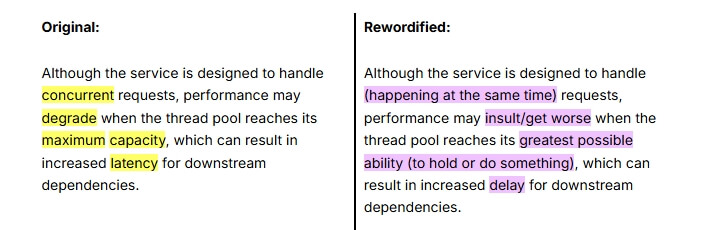
It helps you:
- Understand unfamiliar vocabulary in context
- Highlight unknown words
- Build vocabulary through flashcards and quizzes
- Track learning progress
Natural Reader
Natural Reader converts written content into audio, allowing you to practice pronunciation using your own materials (presentations, emails, notes).
Let's imagine we are preparing for a short presentation. We input the text and select from a range of voices. Then press play and listen to what it could sound like.
Natural Reader is perfect for shadowing:
- Listen to a sentence
- Pause
- Repeat it, matching pronunciation and rhythm
YouGlish
YouGlish shows real-life video examples of words and phrases in context.
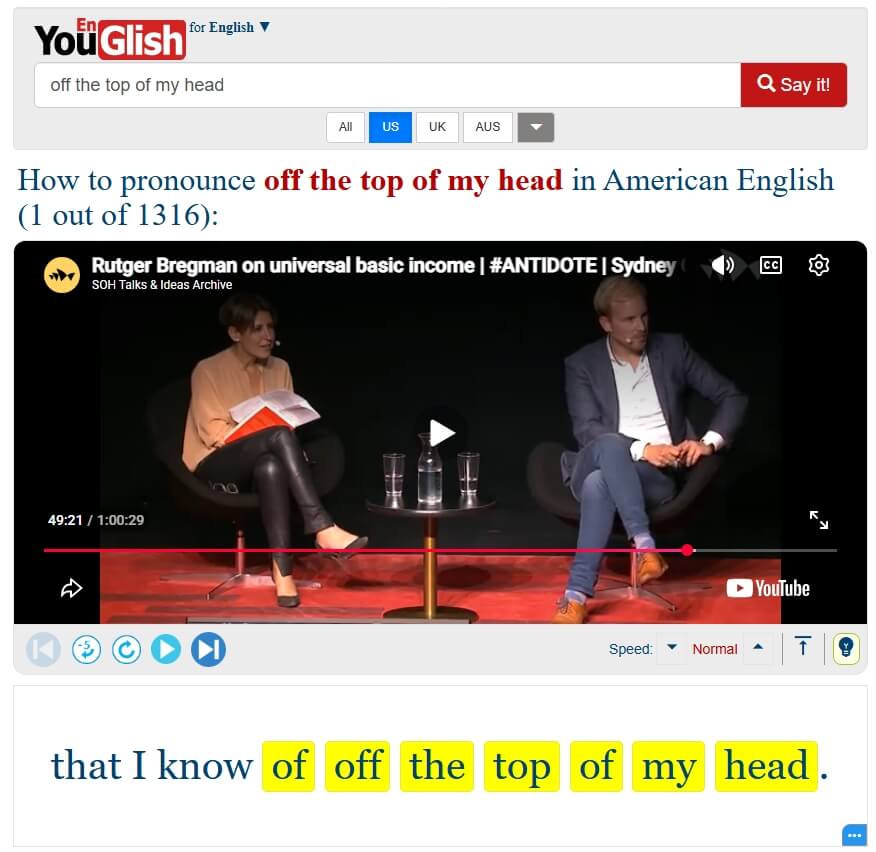
Key features:
- Multiple accents (American, British, Australian)
- Playback speed control
- Subtitles with highlighted keywords
It helps connect sound, context, and meaning.
What happens when We Rely Too Much on AI
Despite its advantages, over-reliance on AI can be problematic. If learners depend too heavily on AI-generated content, they may stop actively thinking in the target language. As a result, there is a risk to:
- Create a gap between your real ability and the AI-generated output
- Stop learning from mistakes
- Develop overly formal or artificial speech patterns
- Trust explanations that may not always be correct.
- Lose confidence when AI is unavailable.
Conclusion: AI as a Partner, not a Substitute
AI tools have transformed language learning by making it more interactive, personalized, and efficient. They enable learners to practice speaking, refine writing, analyze communication patterns, and understand complex material — all within their daily workflow.
However, the key to success lies in using AI wisely. It should serve as a learning partner, not a replacement for real English classes, effort, and critical thinking. By combining AI tools with consistent practice and clear goals, learners can significantly improve their language skills and communication confidence.
Subscribe to our IT Pro Digest
From AI and business analysis to programming tutorials and soft skills, we have it all!
You may also find this interesting
What are the best AI tools for language learning?
How can AI improve speaking skills in a new language?
Can AI help with professional communication?
What is the best way to practice real-life conversations with AI?
Are AI tools enough to learn a language?
What are the risks of relying too much on AI in language learning?
How can AI help with understanding complex texts?
Which tools are useful for pronunciation practice?


