
Framework Example Video
Here is a practical demonstration of automated testing. I will guide you through the setup process. You can watch the video first, or read the article, or jump straight to the quiz!
The Testing Pyramid: A Strategic Approach
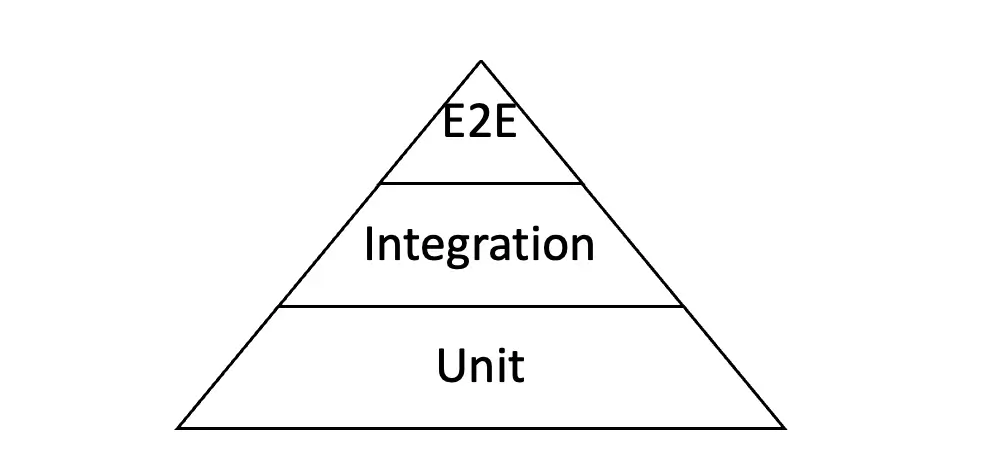
The Testing Pyramid, introduced by Mike Cohn in 2009, remains a guiding framework for efficient testing. It emphasizes a solid foundation for unit tests and minimal high-level tests.
Over the years, variations have added an extra level–acceptance testing, but it's less common.
The testing pyramid acts as a guide to teams in efficiently distributing testing efforts. Unit tests are cheap and quick to do, while high-level tests, though powerful, require greater time and resources.
Levels of Testing: From Unit to E2E
Unit Tests
Unit tests check individual functions or methods, serving as the building blocks of your testing strategy. They are fast, simple to write and execute, and allow developers to quickly identify and fix errors in the foundational elements. These should make up most of your tests.
Integration tests
Integration tests ensure that different modules or services work together seamlessly. As the second tier of the pyramid, they should be fewer in number since they are more complex and time-consuming.
End-to-End (E2E) Testing
E2E test is a much deeper dive into testing. They simulate real-world user scenarios, making them indispensable for comprehensive validation. Although they require significant effort and resources to write, maintain, and execute, their ability to catch user-facing issues makes them essential for every project.
Getting Started
If you’re new to testing, I recommend starting with unit and integration tests, following the structure of the testing pyramid. This will significantly reduce the number of bugs early on, enhancing the overall quality of your project.
However, you should keep in mind these tests will only scratch the surface and uncover superficial mistakes, such as typos and basic logic problems. In other words, they cannot detect deeper problems or user-experience flaws that only real-world usage can reveal.
Educating Your Customers
Convincing customers of the importance of automated testing can be challenging. Often, they are unaware of its value or hesitant to allocate resources. However, don't try to cover everything at once and overwhelm the customer from the start with too much information!
So, how can we convince them? Here’s how to address this:
- Begin Small: Focus on critical flows, like login registrations, and problematic areas prone to errors. Demonstrate the immediate impact of testing.
- Show Results: Use understandable logic to showcase fast, tangible outcomes. For example, show them a “magic trick” where scripts open a browser, fill in the fields, press buttons, and check results.
- Simplify Reporting: Provide concise, results-focused reports that translate hard, technical insights into business value. Just run the tests and receive a report after 5 minutes, demonstrating how easy it is.
The Four Steps to Success
- Define Coverage (UI/API):
Determine the scope (UI/API) and prioritize flows based on project architecture. For example, by understanding the architecture of the project, developers can gauge if UI testing is enough or if API testing would be better. Consider how much testing should be applied. While UI is simple and easy to demonstrate, it might not be that relevant. So, it could be better to focus on API, as it can cover 99% of flows.
- Choose Tools:
Select tools tailored to your stack. Popular options for .NET developers include:
- Web Automation:
- Playwright: Microsoft's feature-rich, ideal for modern projects. I recommend starting with C#, JS, or Typescript. But keep in mind that new features will be available in JavaScript first, then in C# later.
- Selenium: A widely adopted tool with robust community support. You can easily find anything that might interest you.
- Mobile Automation:
- Appium: There are many other similar tools available, but this one is by far the most popular. Versatile for Android and iOS platforms, with cross-platform capabilities.
- API Testing:
- Native http client is enough, for .NET developers and alike. You don't need any special tools.
- Web Automation:
- Select Reporting Tools:
- Native nUnit, xUnit: People usually use native reporting tools in JS Playwright.
If you are writing in C#, native tools may not be sufficient. However, there are other good tools available, such as:
- Extent Report: I use this one (You’ll see the demonstration in the framework video).
- Allure: The most popular tool for displaying results. Yet, some might not be able to use it because it was originally published by Yandex.
- Native nUnit, xUnit: People usually use native reporting tools in JS Playwright.
- Show Results:
Execute tests and highlight their impact. Do not underestimate the power of results. I've witnessed situations where people spent a lot of time on testing but did not show the results. In the end, the customer did not want to pay for it. Starting with simple and understandable forms that will show results is key! Only then will the customer be successfully educated.
Automated Testing Quiz
Now that you’ve learned the key principles of automated testing, it’s time to check your knowledge!
Conclusion
Setting up automated testing has never been easier. By leveraging the right testing tools and effectively demonstrating the results, adhering to strategic frameworks, and focusing on clear communication, you can implement testing seamlessly. With a proactive approach, you’ll enhance not only project quality but also educate customers on the value of this critical process.